Skip to content
In-car connectivity has come a long way, and Ford’s SYNC system is one of the most accessible examples of technology and driving becoming one. If you’re traveling long distances or just around town, the best Ford SYNC apps will make it easy for you to keep your eyes on the road and stay entertained and informed. In this guide, you will learn all there is to know about the most useful apps for either Android Auto or Apple CarPlay and how they work with SYNC 3.0, along with the newer versions of SYNC. Features are explained in detail, with an easy way to sort out what works best for your particular driver needs.
What is Ford SYNC, And How Does it work with Apps
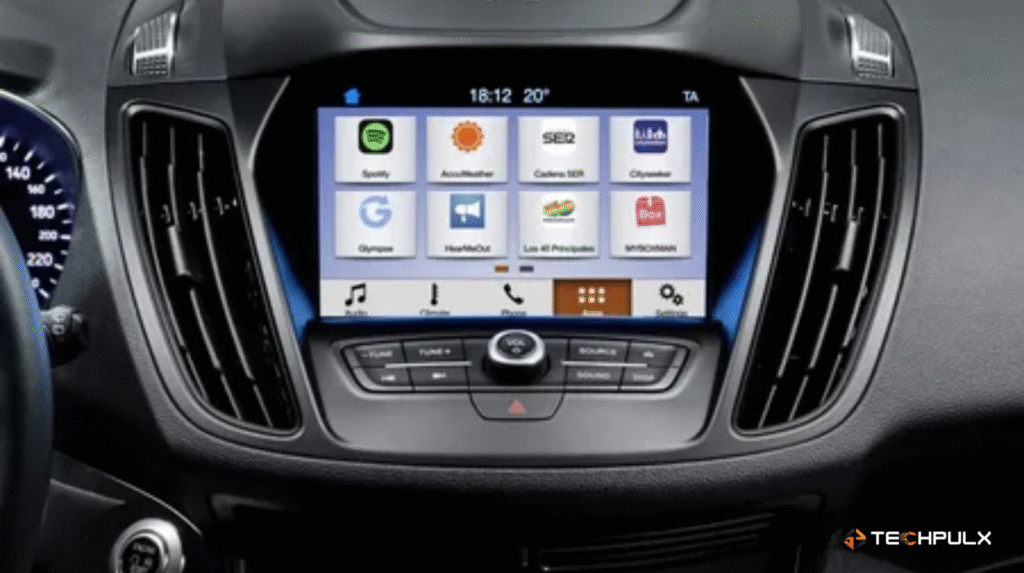
However, before we get into the list straight up, it is important to know exactly what SYNC can do. Ford Sync is a voice-activated infotainment system that connects your vehicle to your smartphone. Simply put: Depending on which version of SYNC your car uses — SYNC, SYNC with AppLink, SYNC 3, or new for 2020, SYNC 4 — you can access apps through Bluetooth and USB connections or built-in integrations like Apple CarPlay and Android Auto and even benefit from tools related to Scamalytics IP.
Ford SYNC is an in-car communication and entertainment system that lets you control music, calls, navigation, and apps using voice commands or touch controls. It connects your smartphone to your vehicle for hands-free convenience and safer driving. SYNC also supports features like Bluetooth, Apple CarPlay, and Android Auto.
How to Connect Mobile Apps to SYNC
Although it varies slightly depending on your model year, setting up SYNC is quite easy. Here’s a brief tutorial to get you going:
- Pair your phone with the system using Bluetooth or USB.
- Open the apps you want to use on your phone so SYNC can detect them. This is especially important on older AppLink versions.
- From the car’s screen, go to Apps or Mobile Apps to view what’s available.
- Allow necessary permissions on your phone if SYNC requests them.
- Use the touchscreen, steering-wheel buttons, or voice commands to begin interacting.
After everything is functioning properly, you’ll discover that the apps you select have a significant impact on the experience. This is where the following list is useful.
Best Navigation and Travel Apps for Ford SYNC
When it comes to driving, navigation is usually the main reason people look for compatible apps. SYNC supports several well-known options that make travel easier.
Waze
A community of users who constantly update maps is behind Waze being ranked one of the top Ford SYNC apps. It keeps you off congestion, suggests shortcuts, alerts you to accidents on the road and may warn of speed cameras. If you’re looking for a navigation feature that’s more than just simple directions, then Waze will suffice.
Google Maps
Most drivers would usually opt for Google Maps, as it is more accurate and encompasses a wider coverage globally. Used in conjunction with Apple CarPlay or Android Auto on later SYNC versions, it’s a user-friendly way to follow unknown roads, find new places and even receive lane-by-lane directions.
Glympse
This one’s not for navigating, but rather sharing your real-time location with friends or family. No matter if you’re meeting a friend or waiting for one, Glympse helps you safely share all kinds of location updates without texts.
AccuWeather
Weather changes may alter your driving plans, especially on longer journeys. AccuWeather provides you with local forecasts and storm alerts, as well as other useful weather news and info. It’s a slight change, but it spares you from not just one nasty shock.
Top Music and Audio Apps for Ford SYNC
Road trips, daily commutes, quick grocery runs – music makes everything better. SYNC supports a variety of streaming apps that work seamlessly once connected, similar to helpful iOS app insights available on modern platforms.
Spotify
With its vast music library, playlists and podcasts, Spotify is an app of last resort for millions of drivers. For use with your SYNC, easily search for and browse songs and playlists, as well as select shuffle or repeat.
Pandora
If you want an easy listening experience, go with Pandora’s radio-like structure. You indicate your preferences and it plays music you like. The app integrates easily with SYNC voice controls, allowing you to change moods on the fly.
iHeartRadio
With iHeartRadio, you can tune in to a variety of local and national radio stations, music playlists and more than 1,000 podcasts. If you’re the type that has to switch the playlists every so often, this app offers a bit of variety to your drive.
Stitcher
Stitcher is a great option for podcast enthusiasts. From comedy to business to true crime stories, you can listen for hours, even with your phone stashed in your pocket.
Apps That Bring Smart-Home Features to Your Drive
Now, driving doesn’t have to be all about movement – it’s about staying connected to your world. Some Ford SYNC apps are not just for entertainment, such as ones through which you can control your smart home or other actions like running errands hands-free.
Ford+Alexa
If you already have Alexa devices at home, this integration becomes incredibly convenient. You can ask things like:
- “Alexa, turn on the porch lights.”
- “Alexa, play my morning news briefing.”
- “Alexa, check the temperature at home.”
And more. It feels almost futuristic when it works smoothly during your drive.
CitySeeker
When you’re traveling to new places, CitySeeker works like a mini city guide,just as online gaming tournaments help people discover event locations easily. It provides restaurant suggestions, attraction details and local insights. Instead of checking your phone in a new city, you get help right on the car screen.
Useful Apps for Car Management and Safety
While entertainment apps get most of the attention, SYNC also supports practical tools that help you manage your vehicle and stay organized.
FordPass
FordPass is technically a standalone mobile app, but it’s a valuable part of the connected driving experience. It lets you:
- Check fuel levels,
- Schedule maintenance,
- Locate your parked car,
- Lock or unlock your vehicle remotely,
- And even start the engine in some models.
Pairing FordPass with SYNC gives you a complete ecosystem where your phone and your car work together.
What to Check Before Downloading SYNC Apps
Before installing anything, it’s good to keep a few small details in mind:
- SYNC version compatibility: Not every app works on every SYNC version.
- Your phone’s operating system: Some apps behave differently on iOS vs Android.
- Region-based availability: A few apps only appear in certain countries.
- App updates: Both your phone apps and SYNC software should be updated for the best experience.
- Whether you use AppLink or CarPlay/Android Auto: This determines how the apps appear on your screen.
These small things save you from wondering why an app isn’t showing up even after downloading it.
Final Thoughts: Choosing the Right SYNC Apps for Your Drive
There are so much of options when it comes to Ford SYNC apps, but the key factor is choosing the ones that match with your driving routine. If you travel often, navigation tools matter most. If you like podcasts or curated playlists, go heavy on audio apps. If you value convenience, adding Alexa or FordPass makes your car feel much smarter.
With the right mix, SYNC helps you stay connected, entertained and relaxed without pulling your phone out. And that’s the whole point – technology should support your drive, not distract you from it.